LUNA Free is a great DAW for beginers on Windows and Mac, developed by Universal Audio with an emphasis on recording, music production and analogue-style mixing. It provides unlimited audio and MIDI tracks, third-party plugin support, intelligent editing tools and a selection of UAD effects without a subscription.
LUNA 3.0 introduces features such as LUNA Play, four-track stem separation, improved MIDI editing and Clip Gain Automation. These tools make the software particularly interesting for musicians who prefer capturing performances before becoming distracted by technical setup or detailed editing.
Unlike many free DAWs, LUNA doesn’t restrict track counts, impose a time limit or watermark exported songs. However, premium console emulations, additional tape machines, advanced stem separation and certain production tools remain exclusive to LUNA Studio
The free edition includes Oxide Tape, eight UAD plugins, Shape Toolkit, ARP Arpeggiator, ARA compatibility and four-track stem separation.
LUNA Studio adds premium API console and tape Extensions, hardware inserts, audio-to-MIDI conversion, six-track stem separation and additional plugins.
LUNA’s recording workflow is designed to reduce the technical decisions that can interrupt a musical idea. LUNA Play offers a simplified environment that detects instruments, helps set recording levels and suggests appropriate UAD processing presets.
For a guitarist developing a song, this means spending less time configuring tracks and more time capturing the performance. Voice control also allows recording to be started or stopped without repeatedly returning to the computer.
However, automatic level setting cannot repair an overloaded audio interface. If the microphone preamp clips before the signal reaches LUNA, reducing the software level won’t recover the distorted recording.
Smart Tempo takes a similarly musician-focused approach to timing. Instead of forcing every performance onto a predetermined BPM, LUNA can analyse natural tempo changes and build a grid around the recording.
Imagine recording an acoustic guitar introduction that gradually accelerates into the chorus. Rather than stretching the performance to match a rigid click, Smart Tempo can create a tempo map that follows the guitarist’s timing.
Additional MIDI instruments can then follow that map while retaining the movement of the original recording. Check the detected downbeats carefully, particularly where the performance contains pauses or unusual rhythmic accents.
LUNA 3.0 also introduces Record FX for native recording workflows, allowing effects to be printed into recordings without Apollo hardware.
This can be useful when committing to a particular guitar tone, but printed processing cannot simply be removed afterwards. For important vocal recordings, preserving an unprocessed version provides greater mixing flexibility.
LUNA Free includes four-track stem separation, allowing stereo recordings to be separated into vocals, drums, bass and other instruments.
For remixing or studying arrangements, this offers considerable creative flexibility. You might isolate a drum groove, remove an existing bassline or examine how a vocal sits against the instrumental. However, separated stems aren’t equivalent to original multitrack recordings. Overlapping frequencies, reverb and complex arrangements can introduce audible artefacts.
For example, cymbals and distorted guitars share considerable high-frequency information. Separating them can affect cymbal decays or leave unwanted fragments in the resulting stem.b LUNA also provides advanced audio warping, including the Razor Blade algorithm designed for percussion editing.
When tightening multitracked drums, preserving the timing relationships between microphones is essential. Moving snare and overhead recordings independently can alter their phase relationships and change the drum’s tone.
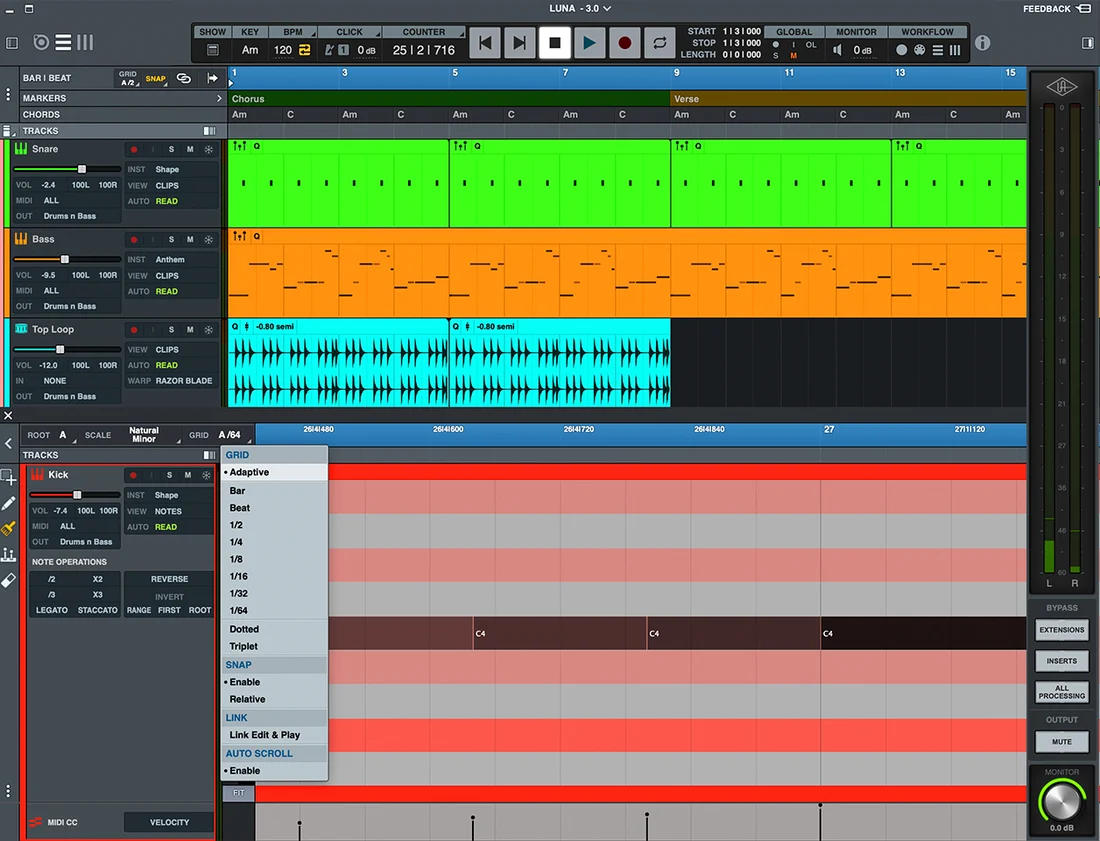
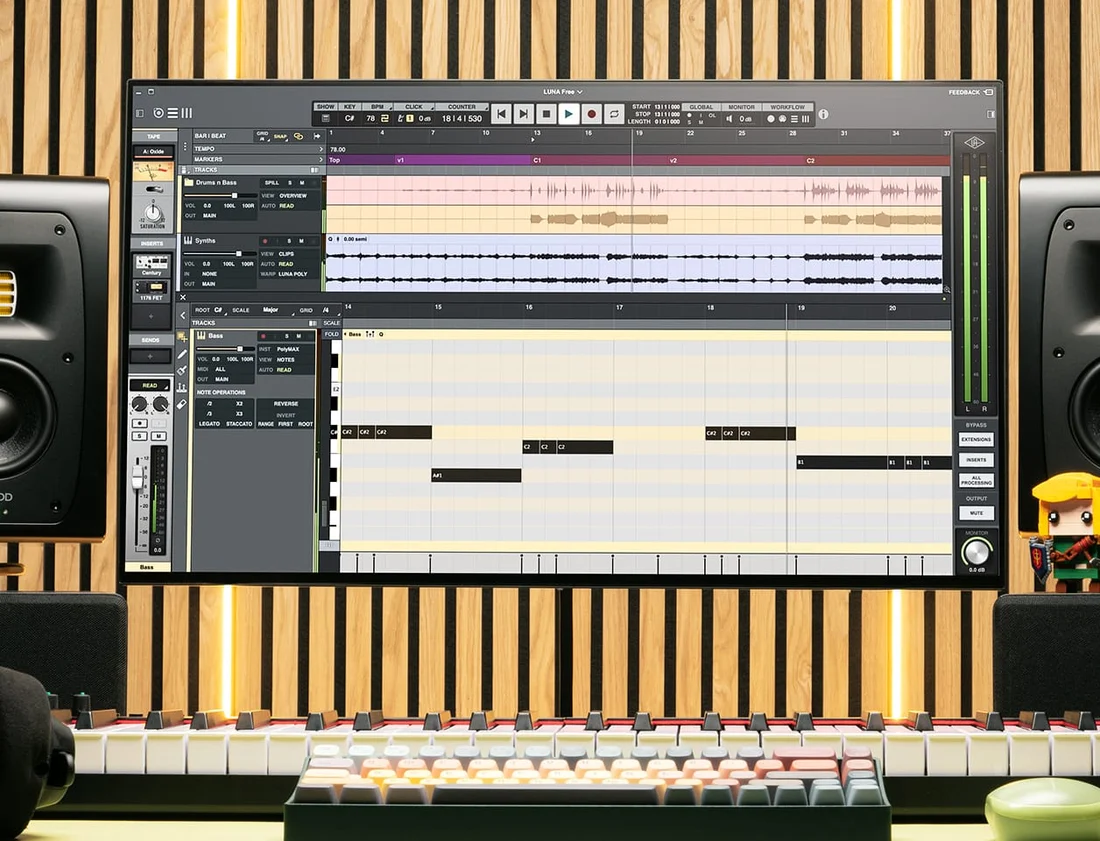
Grouped editing helps maintain those relationships while correcting genuinely distracting timing problems. For MIDI producers, the improved Piano Roll introduces scale-aware editing, while Adaptive Grid adjusts its resolution according to the zoom level.
Clip Gain Automation is another particularly useful addition. Its adjustments occur before plugin processing, unlike ordinary channel-fader changes.
If a vocal phrase triggers excessive compression, reducing its clip gain can control the signal entering the compressor. Lowering the channel fader afterwards only reduces the level of the already compressed sound.
This distinction makes clip gain valuable for evening out performances before applying dynamics processing.
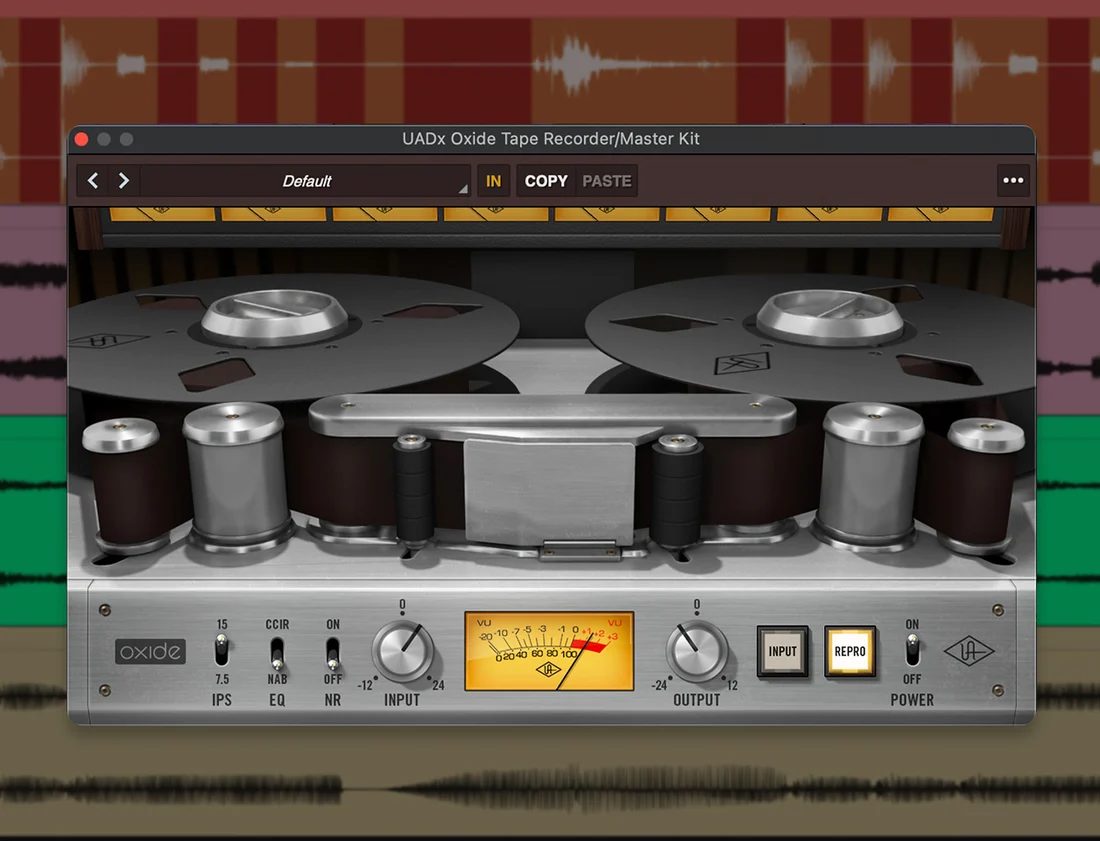
One of LUNA Free’s standout features is the Oxide Tape Extension, which integrates tape-machine processing directly into LUNA’s mixing environment. Unlike a conventional saturation plugin inserted into an effects chain, Oxide operates through LUNA’s dedicated tape system, offering individual saturation controls and a global bypass. Increasing the Saturation control drives the tape model harder, introducing harmonic colour and tape-style compression.
For drums, modest saturation can add density, while stronger settings may soften transients and reduce their impact. Bass instruments can benefit from additional harmonics that help them remain audible on smaller speakers.
However, saturation becomes cumulative when applied across several tracks. Settings that sound subtle individually can make the complete mix feel congested.
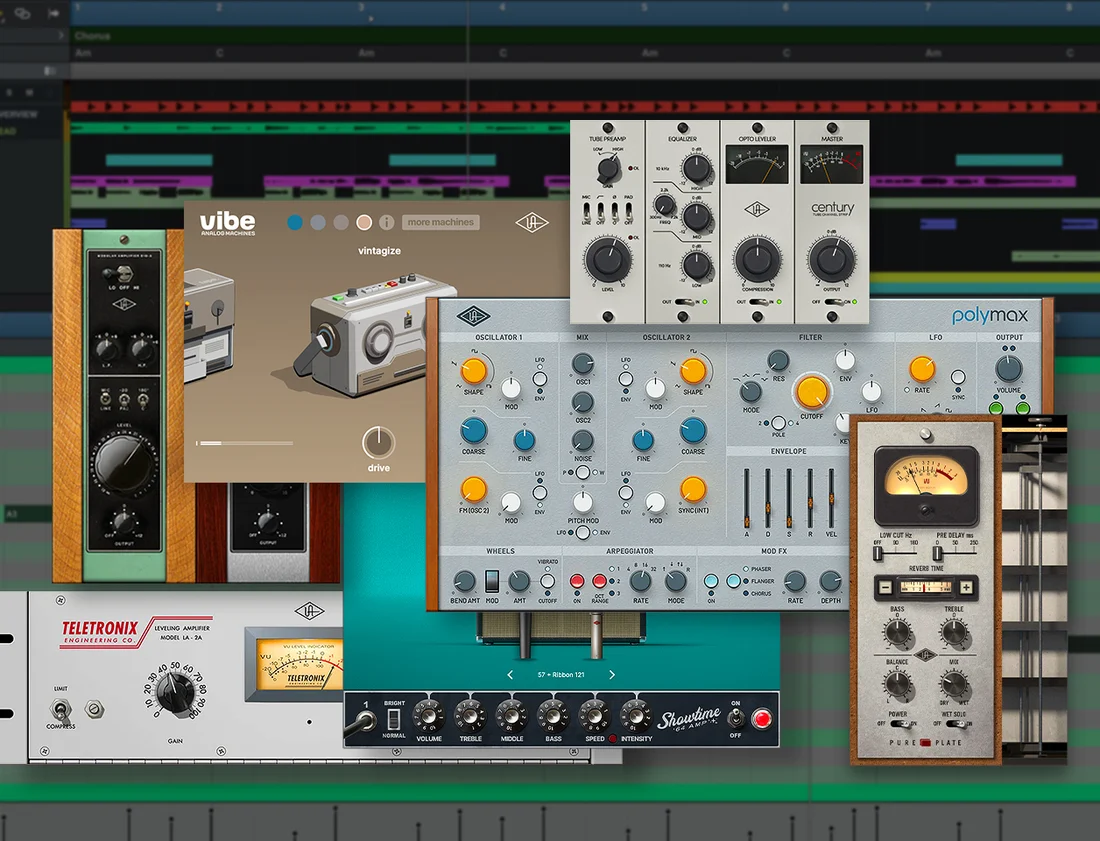
Use Oxide’s global bypass to compare the processed and unprocessed mix at similar listening levels. LUNA Free also includes the UA 1176 Classic FET Compressor and Teletronix LA-2A Tube Compressor. The 1176 offers fast, assertive dynamic control, while the LA-2A provides smoother levelling suited to sustained vocals and bass.
For example, a vocal chain might use an 1176 to catch louder peaks and an LA-2A for gentler overall compression. But stacking compressors isn’t automatically better; excessive processing can remove natural expression. The included UA 610 Tube Preamp & EQ Collection, Century Tube Channel Strip and Pure Plate Reverb provide further mixing options.
Routing multiple vocals to a shared Pure Plate reverb bus can create consistent ambience while allowing each vocal’s reverb level to be controlled independently. Premium API console emulations, Studer tape processing and Ampex mastering tape remain part of LUNA Studio rather than the free edition.
LUNA Free combines traditional multitrack production with intelligent recording, editing and analogue-inspired processing tools.
Some performances lose their character when forced into a rigid tempo. Record the guitar or piano performance naturally, then use LUNA’s Smart Tempo tools to analyse its timing and develop a tempo map. Check the detected bar positions before adding MIDI instruments, particularly around pauses and transitions.
The advantage is that additional instruments can follow the original recording without requiring the musician’s performance to be heavily quantised. This approach works particularly well for acoustic music and singer-songwriter productions where subtle tempo changes contribute to the emotional movement of the song.
LUNA’s included UAD processors provide a useful starting point for recording vocals.
Begin by setting a clean input level on your audio interface. Use the UA 610 for tonal adjustment, an 1176 for controlling peaks and Pure Plate Reverb for monitoring ambience. Avoid adding compression purely because the plugins are available. Listen to whether the processing genuinely improves the recording. If you use Record FX to print processing, remember that those adjustments become part of the recorded sound.
For collaborations, preserving an unprocessed vocal alongside a processed reference gives the mixing engineer more flexibility.
Import a stereo recording and use four-track stem separation to extract its main musical components. You could retain the vocal, replace the bassline with PolyMAX Synth and programme an alternative drum pattern. Listen carefully to the separated elements before committing to the arrangement. Vocal reverb, cymbals and overlapping instruments can leave processing artefacts that become more obvious when exposed.
Filtering, layering and carefully editing the material can help integrate imperfect stems into a new production. Remember that separating copyrighted recordings doesn’t remove the need for appropriate permission when releasing remixes or sampled material.
When editing drums recorded with multiple microphones, maintain their timing relationships wherever possible. Group the related tracks before making timing adjustments and choose an appropriate percussion-oriented warp algorithm.
Start by correcting the most distracting hits rather than automatically quantising the entire performance. A snare consistently placed slightly behind the beat may be part of the drummer’s intended groove. After editing, compare the original and corrected recordings, paying particular attention to the snare tone, overhead microphones and stereo image.
LUNA sessions can transfer between Windows and macOS, although third-party plugin formats require attention. Audio Units plugins used on Mac won’t load on Windows. For cross-platform projects, using VST3 versions on both computers is the safer option.
Confirm that matching virtual instruments, sample libraries and plugin licences are installed. For important collaborations, render software instruments to audio while preserving their MIDI tracks. Export aligned stems and a stereo reference mix as a backup. This helps another producer reconstruct the arrangement even when particular plugins aren’t available.
Yes. LUNA Free works with compatible third-party audio interfaces on Windows and Mac.
Apollo hardware isn't required for unlimited tracks, MIDI editing, stem separation, Oxide Tape or the included UAD native plugins.
However, Apollo provides additional integration, including dedicated low-latency monitoring capabilities.
With another interface, select the appropriate audio device in LUNA's hardware settings and configure its driver and buffer size for recording.
Latency depends on the interface, audio driver, buffer size and plugins used.
For native recording, begin with a buffer of approximately 64–128 samples and check whether monitoring feels responsive.
If playback crackles, increase the buffer gradually until the system becomes stable.
Some plugins introduce additional latency independently of the buffer setting, so temporarily bypass demanding processors when troubleshooting.
An interface with direct hardware monitoring can also help when recording without software effects.
Check that the plugin is installed in a supported format.
LUNA supports VST3 on Windows and Mac, while macOS also supports Audio Units.
Confirm that the plugin is compatible with your operating system, correctly installed and authorised where necessary.
Restart LUNA after installation. If a plugin still fails to appear, check for an updated version and review any plugin-scanning errors.
No. LUNA Free supports ARA integration, but that doesn't automatically include a Melodyne licence.
Compatible ARA software may be used separately if you already own the appropriate licence.
Audio-to-MIDI conversion, six-track stem separation, lyric transcription and chord extraction are LUNA Studio features.
The free edition still provides four-track separation, MIDI sequencing and audio editing without those additional premium tools.
Start with modest saturation settings rather than applying heavy processing across every track.
Oxide introduces harmonic colour and tape-style compression as the input drive increases.
Although individual tracks may sound fuller, the combined processing can reduce clarity and soften important transients.
Try using less saturation on cymbals, distorted instruments and already dense recordings.
Use the global bypass to compare the complete mix at similar listening levels. This helps determine whether the processing genuinely improves the sound rather than simply making it louder.

Qualified sound engineer, music producer and DJ. Founder of Jeffro Music, specialising in music production software reviews, sound design and practical resources for music creators.