Midi Monitor
MIDI Monitor
Real-Time MIDI Inspection for macOS
When MIDI routing goes wrong, guessing wastes time. MIDI Monitor is a free, open-source macOS utility designed to show exactly what MIDI data is entering and leaving your system in real time.
Whether you’re troubleshooting a controller, debugging a virtual instrument, or testing a driver, MIDI Monitor gives you full visibility of every message on the wire.
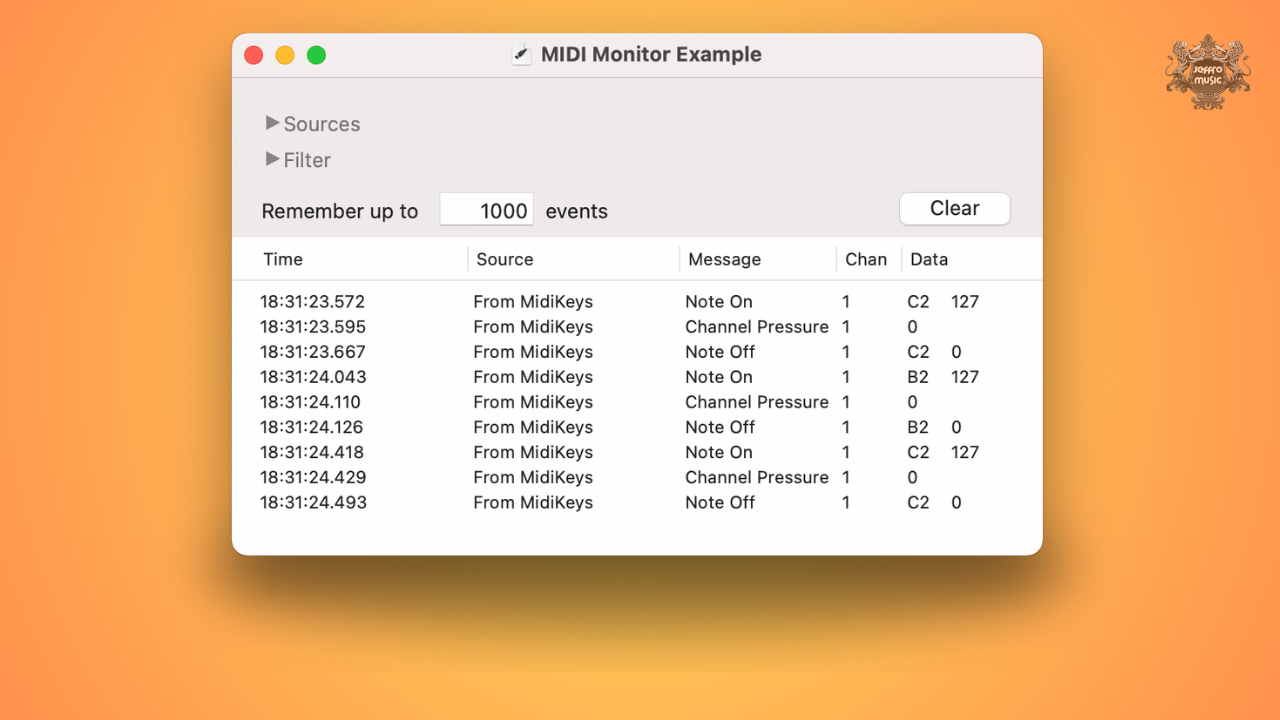
Built specifically for Mac users, the app provides a clean, resizable interface with scrolling event logs that clearly display note data, controller messages, pitch bend, system exclusive (SysEx), and more. It is equally useful for musicians diagnosing stuck notes and developers verifying MIDI implementation.
System Requirements:
- 64 bit
- VST / AU / AAX
- macOs
Clear, Scrollable MIDI Event Display
MIDI Monitor presents incoming and outgoing MIDI messages in a continuously scrolling log. Each event is timestamped and labeled, allowing you to see exactly when and how data is transmitted. You can optionally display raw MIDI byte data alongside interpreted messages, making it ideal for low-level debugging and protocol verification.
The interface is fully resizable and customizable, including adjustable background colors for improved readability during long sessions. Whether you prefer a high-contrast debugging layout or something easier on the eyes, it adapts to your workflow.
Logging, Export & Open-Source Flexibility
For deeper analysis, MIDI Monitor allows you to save captured data as either a text file or a standard MIDI file. This makes it easy to archive sessions, share logs with collaborators, or import captured data into a DAW for further inspection.
The software is completely free and distributed as open source under the BSD license. Developers can review, modify, and build upon the source code, making it a trusted utility within both music production and software development communities.
Key Features:
Simple, lightweight, and precise, it does exactly what it promises — shows you the MIDI truth.
- Real-time display of incoming and outgoing MIDI data
- Resizable, scrolling event log interface
- Optional raw MIDI byte display
- Customizable background colors
- Save logs as text files
- Export captured data as MIDI files
- Accurate timestamped message tracking
- Free and open-source (BSD license)
- Designed for musicians and MIDI developers
FAQ
Yes. Because events are timestamped in real time, you can inspect note-on spacing and controller message intervals to identify jitter, double-triggering, or unstable clock signals. While it is not a statistical timing analyzer, it is precise enough to reveal irregularities from faulty USB interfaces or poorly clocked hardware.
Extremely. MIDI Monitor lets you confirm whether a Note Off or CC reset message was actually transmitted. In large routing setups with multiple virtual ports and IAC buses, it quickly reveals whether the issue originates from the controller, the DAW, or a plugin failing to pass data correctly.
Yes. MIDI Monitor fully displays System Exclusive messages, including raw byte data if enabled. This makes it suitable for verifying patch dumps, firmware transfers, or diagnosing corrupted SysEx communication between hardware and librarian software.
Yes. It can monitor both physical and virtual MIDI ports, making it ideal for debugging multi-app workflows, virtual instrument hosting environments, and custom routing setups using macOS’s IAC Driver.
It can. Because it displays per-channel MIDI data, you can verify channelized note expression, pitch bend ranges, and per-note CC messages. This is especially useful when configuring expressive controllers like Seaboard-style instruments or other MPE-enabled devices.
No. MIDI Monitor passively observes MIDI traffic. It does not alter timing or process the signal path in a way that adds measurable latency.
Absolutely. Since it shows raw MIDI bytes and structured message interpretation, it’s suitable for low-level driver testing, application debugging, and verifying proper implementation of MIDI specifications.